Tutorials & guides
Everything you need to send, sign and verify documents with MauriSign — explained step by step, with screenshots from the real product.
Ask a question about using MauriSign and get an instant answer drawn from these tutorials.
Sending documents

Send a PDF for signature
Upload a PDF, drop signature and date fields onto it, add your signers and send — each gets a secure link and an emailed code.

Type-to-sign a contract (no PDF)
For simple agreements, skip the PDF entirely — write the text, and the signer adopts a typed name to seal a tamper-evident record.

Save time with reusable templates
Turn a document you send often into a template with pre-placed fields, then start new requests from it in a couple of clicks.

Envelopes & signing order
Bundle several documents into one envelope and control who signs first — sequential, parallel, or countersign-last.

Working across companies

Switch between your companies
Run several companies under one login and one bill — switch the company you're working in from the sidebar, each with its own documents, letterhead and audit trail.
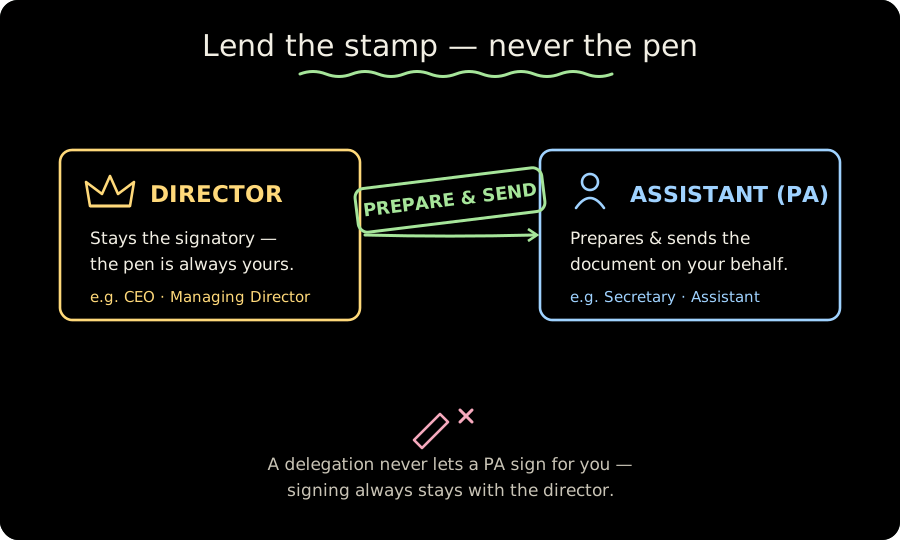
Let an assistant prepare & send for you
Give a personal assistant permission to prepare and send documents on your behalf — without ever being able to sign in your place.
Managing your account

Verify a signed document
Every completed document has a public verification page and a downloadable evidence pack that re-check the cryptographic seal.

Team, billing & security
Invite teammates, manage your plan and bank-transfer payments, and review your account's security and privacy controls.
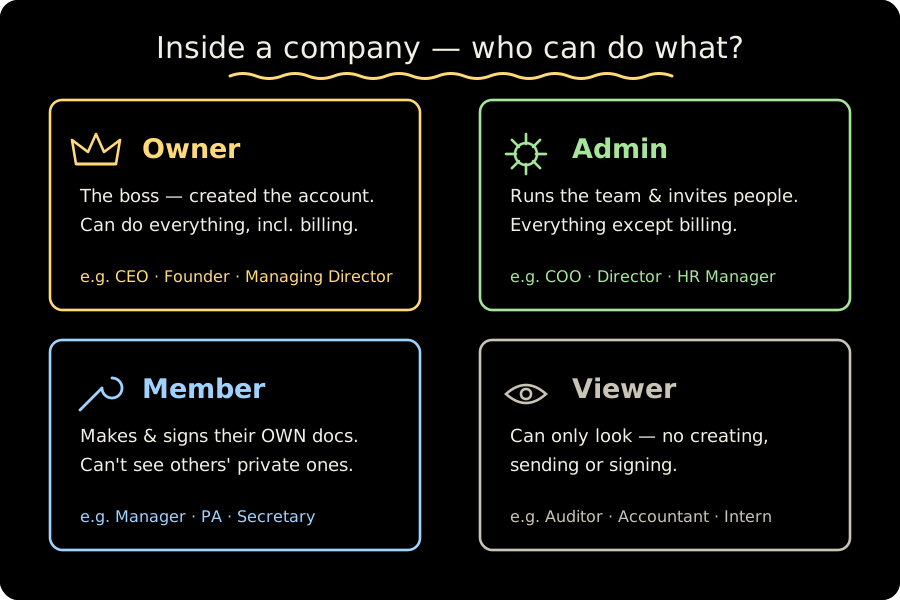
Roles & who can do what
How MauriSign is organised — organisations, companies and the four team roles (owner, admin, member, viewer) — and exactly what each role is allowed to do.
Still stuck?
Sign in and open a support ticket — our team is based in Mauritius and happy to help.
Contact support